

Online booking
Boaters book a transit on the marina’s public page, https://<host>/b/<slug>, in a few steps and without creating
an account. Availability is the real one of the system: no double selling between desk, online page, API and
channels, because the berth is guaranteed by the database.
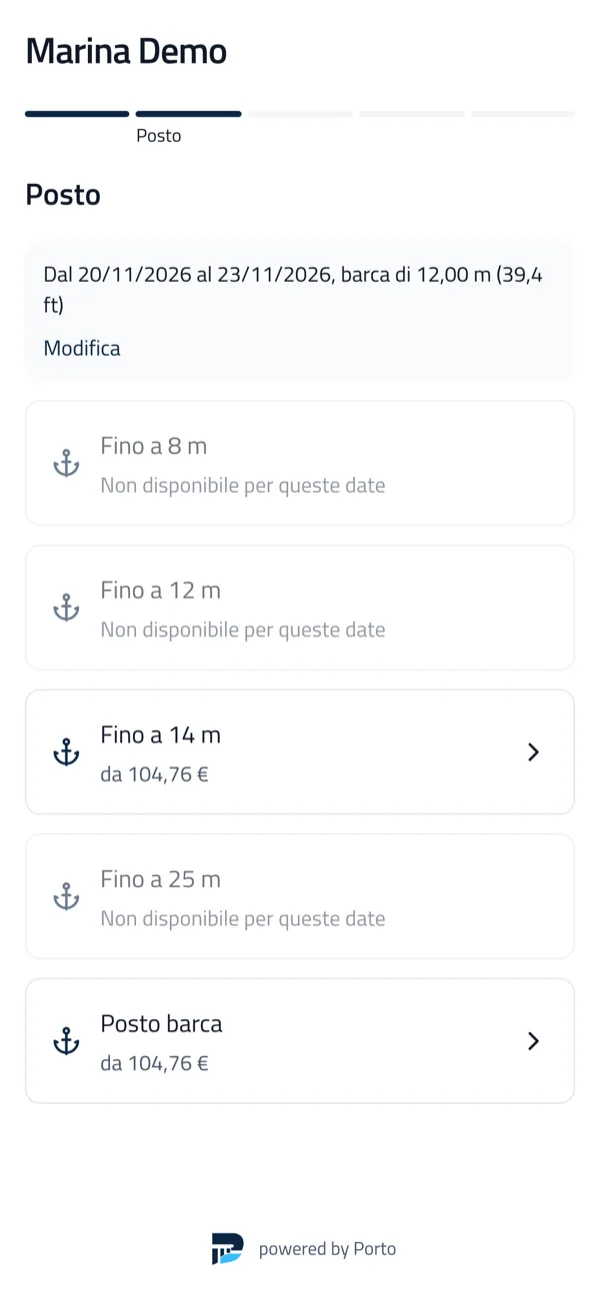
The public page works only when the instance is reachable from the internet (not with the desktop app alone).
The boater’s path
Section titled “The boater’s path”- Arrival and departure dates and boat sizes: for each berth category the page says whether there is room and the price list price.
- Preferences, extras and terms.
- Confirmation: Porto holds a concrete berth for a few minutes (
PORTO_HOLD_TTL, 10 minutes by default). - Customer and boat data, documents (licence, insurance) to be checked by the office.
- Payment of the deposit or the total: online with Stripe, or by bank transfer (manual driver).
- Confirmation email with arrival instructions and the transit QR for the dock staff.
The transit is confirmed only when the payment arrives (Stripe’s signed webhook, or a payment recorded at the office), never when the browser returns. A payment arriving after the hold expired recovers the same berth if it is still free, otherwise it is refunded in full.
At the office
Section titled “At the office”Prenotazioni online lists the bookings from the public page and the channels, with approvals, documents and payments. The berth is assigned at booking time; the office can move the boat before arrival with no effect for the customer if the category does not change.
Approval: boats above a length, or configured groups, wait for approval; the payment is an authorisation captured on approval, with a deadline.
Settings
Section titled “Settings”In Prenotazione online:
- rules: minimum and maximum stay, minimum and maximum lead time, arrival hours, closing days;
- payments: deposit or total, cancellation policy by lead time (refund or credit);
- approval and required fields (documents, insurance, people on board);
- versioned texts: terms, privacy, marketing consent;
- quotas: how many berths of each group can be sold online per night (dock and API are not limited);
- embedding: the domains allowed to show the page on their site, and the look.
Customer area
Section titled “Customer area”With a magic link by email the customer sees bookings, documents, receipts and balance, uploads documents, changes dates (subject to availability) and cancels under the policy, with a preview of the refund.
Embedding the widget in your website
Section titled “Embedding the widget in your website”The page can be linked directly (https://<host>/b/<slug>, with ?lang=en for English) or embedded.
Script (recommended): creates the iframe, resizes it to the content and reports the booking steps.
<div data-porto="example-marina" data-lang="en"></div><script src="https://<host>/embed.js" async></script>Iframe, where only HTML can be pasted (fixed height):
<iframe src="https://<host>/b/example-marina?embed=1&lang=en" style="width:100%;height:720px;border:0" allow="payment" loading="lazy" title="Book a berth"></iframe>- Works with WordPress (“Custom HTML” block), Wix, Squarespace, Joomla and any website.
embed.jsre-dispatches theporto:bookingevent on the container at every step, useful to track conversions. Optional attributes:data-titleanddata-height.- Embedding is allowed only from authorised domains; no third-party cookies are used.
- Payment opens full window; at the end the page shows the outcome with a “back to the site” button.
- The marina’s name comes first, with a discreet “powered by Porto”.
External channels
Section titled “External channels”Porto has an interface to connect berth booking portals, but ships no third-party channel (Extensions).


Porto is developed by Coste360 SRL. Source available under the BSL 1.1; the Porto trademark is not covered by the licence.